How to make your Design System agent-ready: 5 steps

Lately, the question we ask ourselves most in Design Systems is: "How do I make my Design System work properly with agents?"
The short answer is that you don't need a magic plugin or to rebuild everything. I'll tell you the long answer in this post.
The first thing we need to understand is that an AI agent (Claude, Cursor, Copilot, whichever you use) doesn't read your design system the way a person does. A person opens Storybook, looks at three examples, asks on Slack, and understands it. An agent has no one to ask. If something isn't written down explicitly, it makes it up. And it does so with total confidence.
So adding an AI layer isn't about putting AI inside the system. It's about writing down what has always lived in the team's heads, in a way a machine can read, check, and respect.
Here are the 5 steps, or sections, to get your DS ready for agents. They work for any design system, big or small. You don't need to do them all at once, or in this order.
1. Write down what each component IS (and what it ISN'T)
Most design systems document how to use a component: props, variants, examples. Almost none document when not to use it, or why it is the way it is.
But that's exactly what an agent needs. It's also what a new person on the team takes months to learn.
My proposal is that every component has a kind of contract: a readable file (JSON, YAML, or Markdown) with at least these 5 things:
Purpose: What it's for, in one sentence.
Never use for: The most common misuses. For example: "Badge isn't navigation, that's what NavItem is for."
Rationale: Why decisions that seem inconsistent were made.
What can be adapted and what can't: what the product team can decide, and what they need to check with the system team.
Anatomy: Every part of the component, with a name that's the same in code and in Figma.
And one rule that changed the way I work was the contract, which is written before the code.
Design defines that contract first (Purpose, Never use for, Rationale, What can be adapted and what can't, and a first draft of the Anatomy), and then I the design team reviwed it with the dev team so we can finish defining the anatomy properly.
(When Figma and the contract don't match, the contract wins. That way there's always a single source of truth.)
How to start: Take your most-used component (almost always the Button) and write just its short "never use for" list. This is where human judgment comes in.

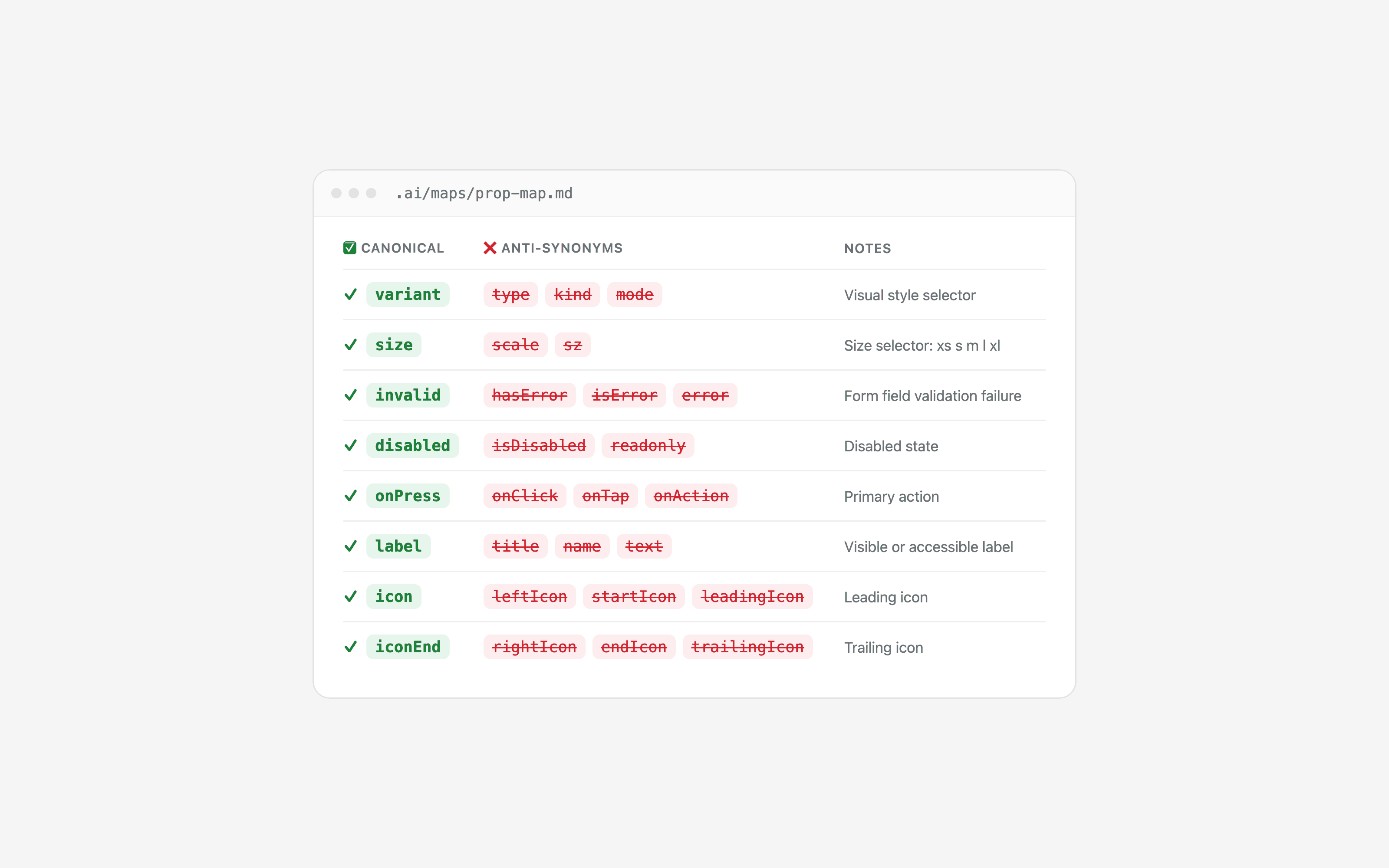
2. Create a props dictionary (with anti-synonyms)
If you don't tell an agent anything, it might call a button's icon leftIcon, startIcon, leadingIcon, iconLeft, or prefix. All five options are reasonable, and all five break your system.
The solution is a dictionary with two columns:
✅ Correct name | ❌ Forbidden names |
|---|---|
|
|
|
|
|
|
The forbidden names column is the key. It's not enough to say what something is called, you also have to say what it's not called, because that's exactly what the agent will try.
And if you want to go a step further, turn that dictionary into a lint rule. That way it doesn't depend on someone remembering. If you also use an agent that supports hooks (code that runs every time it edits a file), you can run the lint automatically so it sees the errors and fixes them itself before handing anything back to you. I extract this concept form the blog of Cristian Morales.
How to start: check what the icon, size, and variant props are called across all your components. You'll almost certainly find three names for the same thing. Pick one and list the others as forbidden. (You can connect your GitHub repo and your Figma file to an agent and ask it to build the whole list for you, and even find the words that already match, so you have a starting point.)
3. Make your tokens explain themselves (and test themselves)
Tokens are already the part of the design system a machine understands best. Even so, there are two very important things that can make the difference.
The first: the name should say what it's for, not what it looks like. E.g.: red-600 tells the agent what a color looks like. But color-text-danger tells it when to use it. If your tokens are only primitives, the agent has to guess which one fits each case, and it may fail and get it wrong. With a semantic layer on top, it can search by concept: "danger background", "focus border", "secondary text".
It helps a lot to have a fixed grammar for names, for example {role}-{modifier}-{state}. That way the system is predictable and an agent can work out names it hasn't seen yet.
The second: nobody should have to remember the rules. Anything you can check with a script, check with a script:
That every text or icon color on its background passes WCAG AA. And do it for light mode and dark mode separately: passing in one doesn't mean it passes in the other.
That there are no colors or radii hand-written in the code.
That exceptions (there are always some) are documented with their why.
A trick that works for me: if a measurement isn't on the scale (6px, for example), don't hard-code it. Split it into two values that do exist (4px + 2px) on nested elements. That way the agent never has an excuse to write a loose number.
How to start: if your tokens are blue-500 and not much more, add a semantic layer on top. It's the highest-impact change on the whole list.

4. Give the agent a way in
Everything we've done so far (contracts, dictionary, tokens) is useless if the agent doesn't know it exists. An agent only reads what you put in front of it.
Think of it like onboarding a new person on your team. There are three levels, and you can start with the first one:
Level 1: A welcome note. A single file at the root of your project with the main rules written in plain language: "always use tokens for colors", "the icon prop is called icon", "never use Badge for navigation"… Depending on the tool, it's called
AGENTS.md,CLAUDE.md,.cursorrules, orllms.txt, but it's the same idea. Most agents read it automatically every time they start working, so you don't have to remind them.Level 2: The team handbook. A folder with everything that doesn't fit on one page: your contracts, the props dictionary, your design patterns (how buttons in a group are spaced, how an empty state or a form is built…), and a lessons learned file. That last one is very simple: every time the agent gets something wrong that wasn't obvious, you write it down there so it doesn't happen again. The welcome note just points to this folder: "if you need more detail, look here."
Level 3: A colleague you can ask. This is an MCP server. It sounds technical, but the idea is simple: instead of the agent reading documents, it can ask your design system questions directly, like "what is this component for?", "which token do I use for a danger background?", or "is this code correct?". It's the difference between handing someone a manual and sitting them next to someone who knows the answers. You need a developer to set it up, and it's only worth it once levels 1 and 2 are in place.
And there's one more thing that isn't technical, but for me it's the most important: write down your decisions, not just your rules. "Only floating elements have a shadow" is a rule. "Because our design is flat, and a shadow makes something look like it's floating when it isn't" is the decision behind it.
When the agent, or a new person, understands the why, it makes better choices in cases you never anticipated. And the reason doesn't disappear when someone leaves the team.
These short documents are usually called ADRs (Architecture Decision Records), but a simple page per decision is enough.
How to start: write a one-page welcome note with the 5–10 rules you repeat most often in reviews. You don't need an MCP on day one.

5. Measure: don't trust one good answer
This is the step fewest people take, and the one that has taught me the most.
An AI model never gives the same answer twice. If you ask it for a form, it gets it right and you think "Yay, it works!", you haven't actually checked anything. Next time it might get it wrong.
That's what evals are for. An eval is an exam you give your design system, through the agent. And when the agent fails, most of the time it isn't the agent's fault: it's something your system doesn't explain clearly. Evals don't measure the agent, they measure your design system.
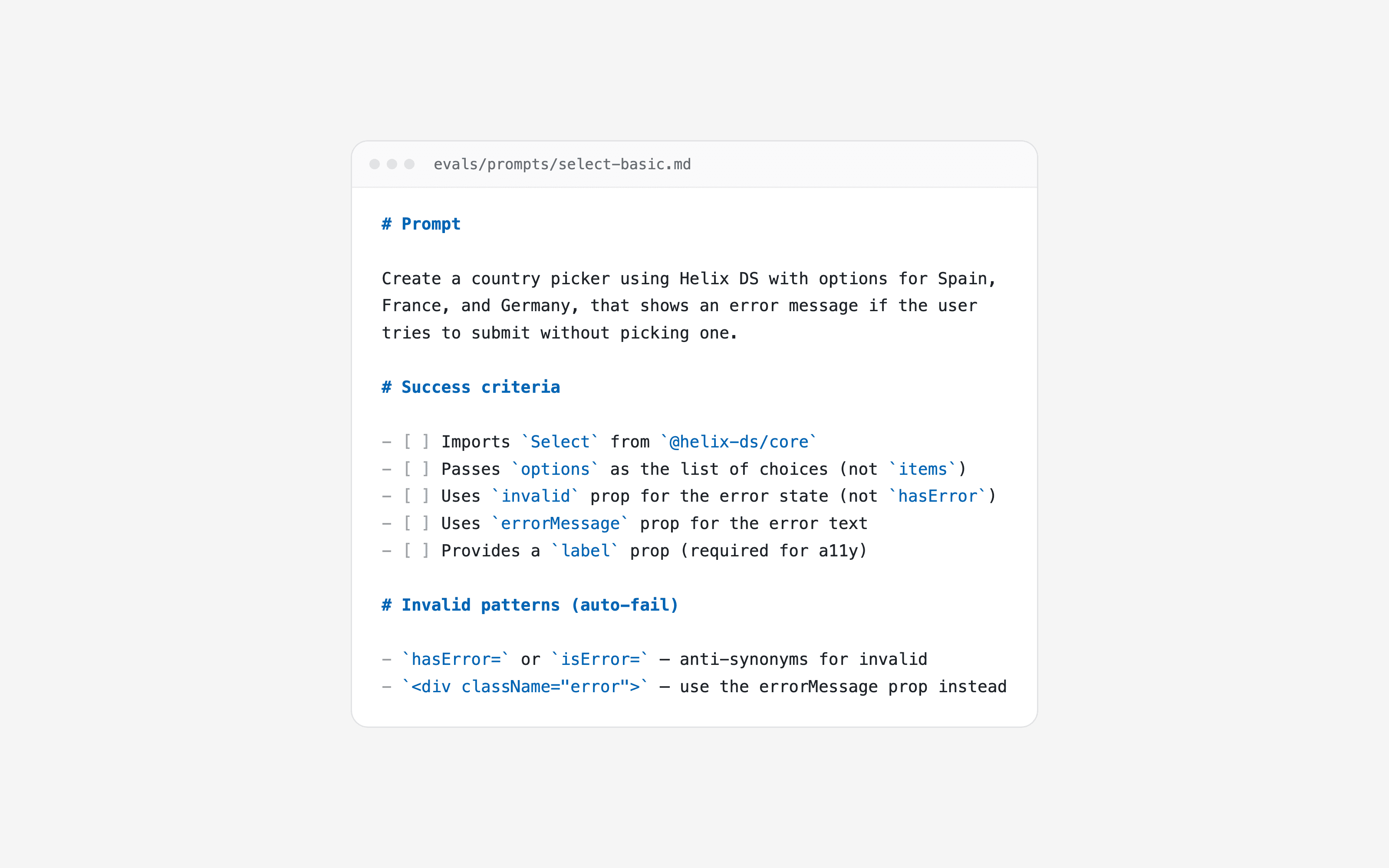
You don't need code to start, a spreadsheet is enough:
Write a real request, the way your team would ask for it: "Build a country picker that shows an error if the user doesn't choose one."
Decide what "correct" means before asking. A short yes/no checklist: what it must have (uses Select, uses the invalid prop, has a label) and what makes it fail automatically (uses hasError, writes a color by hand). This list comes almost straight from your props dictionary and your token rules.
Ask the agent 5 times, in a new conversation each time, and count how many pass. 3 out of 5 is 60%.
Read the failures before fixing anything. Write one line about what went wrong in each. You'll see most of them point to something missing or unclear in your system.
Change one thing and measure again. If the percentage goes up, the change worked.
How to start: write 5 requests for your 5 most-used components, each with its checklist. Run each one 5 times. Read the results calmly. With that, you already have your first list of things to fix.
Wrapping up
If you only keep one idea, let it be this: making your design system "AI-ready" is, deep down, documenting all the decisions we've been making on autopilot for years.
Everything I've told you (contracts, vocabulary, semantic tokens, written decisions, measurement) is also super useful for the people on your team. AI just forces you to write it down and truly commit to it, because it doesn't forgive ambiguity.
You don't need to do it all at once. If I had to start from scratch, this would be my order:
A one-page instructions file (an afternoon).
A props dictionary with anti-synonyms (a day).
A semantic token layer (depends on where you're starting from).
Contracts for your 3 main components.
Your first 5 evals.
Thank you
Everything I've shared here is a mix of what I've learned from blogs, people and a community I keep coming back to. None of this came out of nowhere.